R Markdown ve Quarto Karşılaştırması: Hangisi Tercih Edilmeli?
Çalışan bir R Markdown akışını bırakmalı mısınız? İki aracı kaynak dosyadan çıktı biçimlerine, çoklu dil desteğinden geçiş maliyetine kadar karşılaştırıyor; kararı neyin belirlemesi gerektiğini anlatıyorum.
- Araçlar
İki araç ne işe yarar?
R Markdown ve Quarto, anlatı ile çalıştırılabilir kodu aynı belgede birleştirerek analiz raporu üretir. Kod çalıştırılır; tablolar, grafikler ve sonuçlar belgeye otomatik eklenir. Bu, elle kopyalama hatalarını ortadan kaldırır ve raporu güncellemeyi tek komuta indirir.
R Markdown, R ekosistemi için olgun ve çok yaygın bir belge akışıdır. Quarto ise Pandoc tabanlı, birden çok programlama dilini ve geniş yayın biçimlerini kapsayan, proje düzeyinde bir yayınlama çerçevesidir.
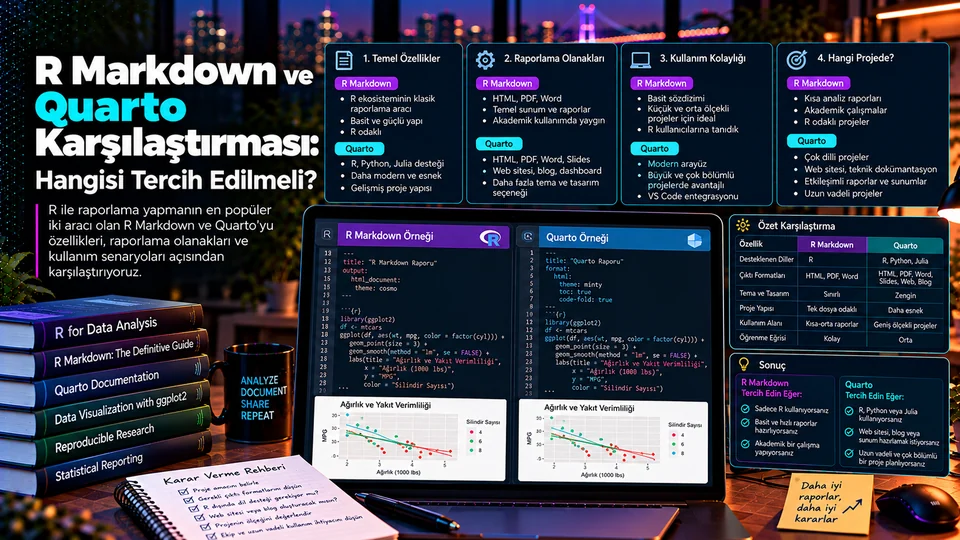
Özelliklere göre karşılaştırma
| Başlık | R Markdown | Quarto |
|---|---|---|
| Kaynak dosya | .Rmd, YAML ve Markdown | .qmd, YAML ve Pandoc Markdown |
| Kod çalıştırma | R ve knitr merkezli | R, Python, Julia, Observable ve Jupyter |
| Çıktılar | HTML, PDF, Word, sunumlar | HTML, PDF, Word, Typst, Reveal.js, PowerPoint, ePub ve daha fazlası |
| Proje türleri | Raporlar; ekosistem paketleriyle kitap, site, blog, sunum | Rapor, kitap, web sitesi, blog, sunum, dashboard |
| Özelleştirme | R paketleri ve özel output formatları | YAML, temalar, filtreler ve uzantılar |
| Editör | RStudio ile yerleşik entegrasyon | RStudio, VS Code, Jupyter ve metin editörleri |
Çıktı seçenekleri belge formatına göre değişir. PDF üretimi LaTeX ya da seçtiğiniz PDF motorunun kurulumunu gerektirebilir; HTML'de çalışan etkileşimli bir öğe Word çıktısına aynı şekilde taşınmaz. “Destekleniyor” ile “aynı görünüyor” farklı şeylerdir.
Kaynak dosyaları nasıl görünür?
İki araç da YAML başlık, Markdown metni ve kod parçalarından oluşur. Tek belirgin fark başlıkta: R Markdown çıktıyı output, Quarto ise format alanında tanımlar.
---
title: "Aylık Satış Analizi"
output: html_document
---

## Özet
Satış eğilimini inceliyoruz.

```{r}
summary(satislar)
```---
title: "Aylık Satış Analizi"
format: html
---
## Özet
Satış eğilimini inceliyoruz.
```{r}
summary(satislar)
```Gövdenin neredeyse aynı olması tesadüf değil — Quarto bilinçli olarak tanıdık bir sözdizimi korur. Quarto'da aynı projeye Python veya desteklenen başka dillerin kod hücreleri de eklenebilir; ancak her dilin çalışma ortamı ve bağımlılıkları ayrıca yönetilmelidir.
Raporlama ve yayınlama
R Markdown; tekil analiz belgeleri ve R merkezli ekiplerin HTML, PDF veya Word raporları için güçlü bir seçimdir. bookdown, blogdown ve xaringan gibi paketler yıllardır kitap, site, blog ve sunum akışları sağlıyor.
Quarto bu tür içerikleri tek bir proje çerçevesinde toplamayı hedefler. Kitap, web sitesi, blog, sunum ve etkileşimli dashboard seçeneklerini doğrudan sunar; kaynak yazımında Pandoc Markdown'ın geniş özelliklerinden yararlanır.
Hangi projede hangisi?
| İhtiyaç | Başlangıç tercihi | Neden? |
|---|---|---|
| Uzun süredir çalışan R Markdown raporu | R Markdown'da kalın veya aşamalı geçin | Çalışan akışın bakım maliyeti düşüktür. |
| R ile tek bir HTML/PDF raporu | İkisi de uygun | Ekip alışkanlığı ve mevcut şablonlar belirleyici. |
| R ve Python aynı projede | Quarto | Farklı dilleri ortak doküman akışında birleştirir. |
| Kitap, dokümantasyon sitesi veya dashboard | Quarto'yu değerlendirin | Proje ve yayınlama özellikleri kapsamlıdır. |
| Özel R Markdown formatlarına bağımlılık | Önce uyumluluğu araştırın | Her özel işlevin bire bir karşılığı olmayabilir. |
R Markdown'dan Quarto'ya geçiş
Birçok basit R Markdown belgesi Quarto ile neredeyse hiç değişiklik yapmadan render edilir. Ama her paket, her özel biçim ve her özelleştirme otomatik taşınmaz. Bu yüzden geçişi tüm projeyle değil, küçük bir örnekle başlatın.
- Bir Raporu
Seç - Ortamı
Sabitle - Render Edip
Karşılaştır - Özel Formatları
Doğrula - Ölçekle
- En çok kullanılan raporu ve bağımlılıklarını seçin.
- Quarto ile R/Python çalışma ortamını sabitleyin.
- Render edip tablo, grafik, çapraz referans ve ek dosyaları eskisiyle karşılaştırın.
- Özel format ve eklentilerin karşılığını tek tek doğrulayın.
- Otomatik üretim ve yayın adımını sınadıktan sonra diğer raporlara ölçekleyin.
Quarto'nun resmî SSS'si R Markdown'ın desteklenmeye devam ettiğini ve acil bir geçiş zorunluluğu olmadığını açıkça belirtiyor. Yani bu bir “ne zaman geçmeliyim” değil, “geçmem gerekiyor mu” sorusu.
Karar kontrol listesi
Çıktı biçimleri
Hangi formatlarda yayın yapacağınız baştan belli olsun; PDF ve Word farklı maliyetler getirir.
Diller ve paketler
Projede hangi dillerin çalışacağı ve bağımlılıkların nasıl yönetileceği netleşsin.
Şablon ve uzantılar
Kullandığınız özel formatların yeni araçtaki karşılığını listeleyin.
Render ortamı
Ortamın ekipteki herkeste ve otomasyonda kurulabilir olduğunu doğrulayın.
Örnek çıktı
Karar vermeden önce gerçek bir raporu uçtan uca render edip gözden geçirin.
Geçiş maliyeti
Kazanılacak özellikle harcanacak emeği açıkça karşılaştırın.
Tercihi gerçek ihtiyaç belirlesin
R Markdown; oturmuş R raporları ve mevcut iş akışları için hâlâ tamamen geçerli bir seçenektir. Quarto ise yeni projelerde çoklu dil desteği, daha geniş yayın biçimleri veya kitap, site ve dashboard gibi hedefler söz konusu olduğunda öne çıkar.
Bu karşılaştırmada “kazanan” aramak yanlış soru. Doğru soru şu: mevcut akışınız sizi engelliyor mu? Engellemiyorsa geçiş, çözdüğünden fazla iş yaratır. Engelliyorsa Quarto'nun sunduğu proje çerçevesi o engeli büyük ihtimalle kaldırır.
Resmî kaynaklar
What are these two tools for?
R Markdown and Quarto produce analysis reports by combining narrative with executable code in one document. The code runs; tables, charts and results are inserted automatically. That removes copy-paste errors and reduces updating a report to a single command.
R Markdown is a mature and widely used document workflow for the R ecosystem. Quarto is a Pandoc-based, project-level publishing framework covering several programming languages and a broad set of output formats.
A feature comparison
| Area | R Markdown | Quarto |
|---|---|---|
| Source file | .Rmd, YAML and Markdown | .qmd, YAML and Pandoc Markdown |
| Code execution | Centred on R and knitr | R, Python, Julia, Observable and Jupyter |
| Outputs | HTML, PDF, Word, presentations | HTML, PDF, Word, Typst, Reveal.js, PowerPoint, ePub and more |
| Project types | Reports; books, sites, blogs and slides via ecosystem packages | Reports, books, websites, blogs, presentations, dashboards |
| Customisation | R packages and custom output formats | YAML, themes, filters and extensions |
| Editor | Built-in RStudio integration | RStudio, VS Code, Jupyter and text editors |
Output options vary by document format. Producing PDF may require LaTeX or whichever PDF engine you choose; an interactive element that works in HTML does not carry over to Word in the same way. “Supported” and “looks the same” are different claims.
What do the source files look like?
Both tools consist of a YAML header, Markdown text and code chunks. The one clear difference is in the header: R Markdown declares the output under output, Quarto under format.
---
title: "Monthly Sales Analysis"
output: html_document
---

## Summary
We examine the sales trend.

```{r}
summary(satislar)
```---
title: "Monthly Sales Analysis"
format: html
---
## Summary
We examine the sales trend.
```{r}
summary(satislar)
```The bodies being nearly identical is no accident — Quarto deliberately keeps a familiar syntax. In Quarto you can also add code cells in Python or other supported languages to the same project; but each language's environment and dependencies still have to be managed separately.
Reporting and publishing
R Markdown is a strong choice for individual analysis documents and for R-centred teams producing HTML, PDF or Word reports. Packages such as bookdown, blogdown and xaringan have provided book, site, blog and presentation workflows for years.
Quarto aims to gather this kind of content under a single project framework. It offers book, website, blog, presentation and interactive dashboard options directly, and draws on the broad feature set of Pandoc Markdown for authoring.
Which one for which project?
| Need | Starting choice | Why? |
|---|---|---|
| A long-running R Markdown report | Stay on R Markdown, or migrate gradually | A working flow has low maintenance cost. |
| A single HTML/PDF report in R | Either works | Team habits and existing templates decide it. |
| R and Python in the same project | Quarto | It unifies different languages in one document flow. |
| A book, documentation site or dashboard | Evaluate Quarto | Its project and publishing features are comprehensive. |
| Dependence on custom R Markdown formats | Check compatibility first | Not every custom feature has a one-to-one equivalent. |
Migrating from R Markdown to Quarto
Many simple R Markdown documents render in Quarto with almost no changes. But not every package, custom format and customisation carries over automatically. So start the migration with a small example rather than the whole project.
- Pick One
Report - Pin the
Environment - Render and
Compare - Verify Custom
Formats - Scale Up
- Choose your most-used report along with its dependencies.
- Pin the Quarto and R/Python working environment.
- Render it and compare tables, charts, cross-references and supporting files against the old output.
- Verify the equivalent of every custom format and extension, one by one.
- Once the automated build and publish step is tested, scale to the other reports.
Quarto's official FAQ states plainly that R Markdown continues to be supported and that there is no urgent need to migrate. So this is not a question of “when should I switch” but of “do I need to at all”.
A decision checklist
Output formats
Know up front which formats you will publish; PDF and Word carry different costs.
Languages and packages
Be clear about which languages will run and how dependencies are managed.
Templates and extensions
List the equivalent of every custom format you rely on in the new tool.
Render environment
Confirm the environment is reproducible for the whole team and in automation.
Sample output
Render a real report end to end and review it before deciding.
Migration cost
Weigh the features gained against the effort spent, explicitly.
Let the real need decide
R Markdown remains an entirely valid option for established R reports and existing workflows. Quarto comes to the fore in new projects where multi-language support, a wider set of publishing formats, or targets such as books, sites and dashboards are involved.
Looking for a “winner” in this comparison is the wrong question. The right one is: is your current workflow holding you back? If it is not, migrating creates more work than it solves. If it is, Quarto's project framework will most likely remove the obstacle.